
Create a simple Photolog using Blogger.com and Lightbox JS. A step by step guide for photo bloggers; to Integrate Lightbox with their existing Blogger publishing system.
 Blogger is a popular weblog publishing system, which supports custom designs and templates. Meanwhile Blogger is not much popular as other blog publishing system like WordPress, etc for its support to Plug-ins. In other hand Lightbox JS is a simple, unobtrusive script used to overlay images on the current page. It is lightweight and works with most of the browsers with Javascripts enabled.
 Yesterday, I was trying to publish my own Photolog. I was looking for a good web serice so that it would ease my task. I am with Blogger for a quite time and still I have not moved my blog to WordPress, even I wish so. So I decided to go with Blogger again with the FTP publishing enabled. But blogger didn’t have any ready made plug-in for Lightbox so I had to hack the code little bit. Blogger with Ligthbox would give any blog a realistic Photolog look.
Step by Step Guide:-
- Download the Lightbox JS script from Here and copy the scripts to your web server most likely where your blog is been published.
- Login into Blogger system and go to Template –> Edit HTML
- Add the below line into the Meta section of HTML tag
<link rel="stylesheet" href="css/lightbox.css" type="text/css" media="screen">
- Add the following scripts tag in the header section of the HTML template
<script type="text/javascript" src="js/prototype.js"></script>
<script type="text/javascript" src="js/scriptaculous.js?load=effects"></script>
<script type="text/javascript" src="js/lightbox.js"></script>
- Check the CSS and make sure the referenced prev.gif and next.gif files are in the right location. Also, make sure the loading.gif and close.gif files as referenced near the top of the lightbox.js file are in the right location.
- Once you’re done Save the Template.
- With Blogger, we will not able to tweak their system directly, since it is not open source software. So we need to have little manual effort every time before you publish a photo log entry.
- After creating a blog entry in Blogger system, do the following steps before publishing.
- Go to Edit HTML option in the Post window as show in the figure

- Once you have uploaded the image you will see an entry similar shown in the figure below.
- Replace the selected code above with
rel=â€lightboxâ€as shown below
- You can also add title tag in tag to enable Caption in the LightBox displayed
- Now you’re all set and you can publish your Photolog.

If you like to have image sets for each post entry then you need to add rel="lightbox[group_name]" for all the images that you which to show in that particular group image set. It should be similar to the below image.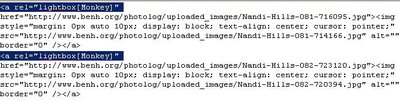
Now you have a wonderful Photolog to start with as I do; Visit my PhotoLog at The PhotoLog
hello came to your blog thru JohnTP blog..
you seems to be intersted in technorati fav exchange.
Can we exchange technocarti fav?
If yes, add my blog to your technocrati fav and drop a msg on my blog, and i will add you in my technocrati fav
Thanks
Arpit
http://technicalbliss.blogspot.com
my technocrati username is arpitagarwal82
apparently i am doing something wrong… its not working for me…
yeah me neither, please help, when i click on the image it loads at the bottom of the page
Hey… guys.. give me the URL which you’re running the test site… Have a look at my site… http://www.benh.org/photolog/index.html
Thanks for your great tips, I tried your tips and it seems to work well, only for one problem. Now, on my post, the image I uploaded is no longer center-align, but align to the left of the main post window, can you please help?
Here is my sample post: http://www.rasamalaysia.com/2007/05/lightbox_test.html
Here is the HTML code of my post:
Homemade biscuits, Red Lobster style.
hey.. I checked up your site.. I was not able to check in much detail, since the image you uploaded is not available anymore in your site. can you update tat.
I want to embedded the Lightbox JS script into an image into my blog (blogger.com).But i can’t find how to execute the first step
>
Where exactly in my blogger.com ?
Can you help me …
Thanks.
hey, if you’re running new blogger then here is what you need to do.
Goto Settings — > Template –> Page Elements
Add HTML/JavaScript page element into your blog. Paste the Java Script there. Now you’re all set. Now you follow from step 5. Let me know if that helped. !
For some reason its not working and need your help.
priya – Sure, I would contact you. Will try to set that up for you.
Ben,
Thank you for your help and it works great.
Priya – I’m pleased to hear that 🙂 Good luck and thanks for the credit 🙂
hello benedict,
i’m using blogger, using a free account …
how do i actually upload the lightbox css files to blogger?
Thanks in advance …
Jayson Ang– That is the limitation of Blogger account. You would not be able to do that. Instead you have to depend on third party hosting. You can use Google Pages for uploading the files for free. Hope this helps.
Hi Benedict,
I try your tutorial, and it works very well… I just have one problem. When I click to go to the next page (I have five posts in each page), the lightbox in the next page does not work anymore. Have you seen this?
Hi Benedict,
Thanks for your great work! I have wanted this feature for some time and have made time to get it done. I followed your tutorial carefully and consider I have placed the code segments in the correct places however, my test image still loads in a new page 🙁
I loaded the .js and .css files in GooglePages and edited the image (and other) links where required, and changed the URL references in your code to correspond to these file paths. Can you see what I have done wrong? Your help will be appreciated.
Hello Benedict – I posted a comment earlier today … now it's gone. I followed every step of your guide, but my test image still loads in a separate page. Can you help please?
Hi Benedict, Many thanks for this article, I've been trying to add lightbox to my blogger account for a while and followed the steps but my photos don't load – instead the lightbox loads but without anything in it.
Please help if possible.
Pingback: ♥♥ diLLa’s page: emang site nya orang paling keren sjagat raya.. ♥♥
benedict,
when i try to post an image and use the lightbox feature, it starts to work, and then my image loads at the bottom of the page. i can tell that it's almost there, but this seems to be a problem some people have had…i think it has something to do with this "rel=lightbox" feature.
could you help me out?
thanks,
chad
Hi.
I’m also trying to get the light box up and running. As far as i can tell I have followed all the instructions correctly and the lightbox works for pages hosted on my site alongside the js files and css but when i try to do it in Blogger clicking on the link takes me straight to the link location. I’ve had a look at the source code for a couple of functioning pages (e.g. Benedict’s page) and noticed that one of the lines looks as follows:
if i try to copy that into my own template (changing the urls to point to my own site) i get an error message from blogger saying that the xml is not well formed. Ive tried tinkering with the ” and while there are no error messages then the light box does not work. Any suggestions on how to add this line to Blogger in such a way that it doesn’t cause errors? Thanks in advance.
Shane
Could you please help me with integrating lightbox V2 for blogger xml template..
Hi Ben,
I tried the newest lightbox js and made it work so far… BUT:
my blogger-pictures are automatically saved to the blogger-server on an adress starting with http://bp0.blogger.com…. and nothing happens. the script is loading for hours without displaying anything, not even the size of the pic. if the picture I want to display is refered on a usual http://www… adress everything is fine.
Any suggestions?
funny, found the answer myself!
if anyone else interessed: the new blogger server bp0.blogger.com transfers yor pictures to websites! they cant be displayed by lightbox.
solution:
in the url of the picture (which is actually a website) is always ending like this : /s1600-h/your.jpg remove the -h and everything is fine!
phew!
how exactly do you “copy the scripts to your web server most likely where your blog is been published.” I can’t go through the next step since i don’t know how i’d copy the scripts to blogger
Thanks Benedict for this post. Thanks Claude for helping with the -h thing 🙂 Works like a charm now.
It’s all very nice, but how is it that most of the bloggers that have tried to do this can’t make it work?
I’ve made it work in my server homepage. In blogger, referencing the code to the same server… impossible!
Tried the code in many positions in the html blogger template. It blocks the page from being loaded.
Tried it (the js part) in a page element of the layout… the links for the images died, they don’t even open anything.
So… how is it that those that have managed, simply don’t explain how they did it? Where does the code go? There’s no meta tag in webblog. Where in the header section and how to present blocking? Now that would be helpfull …
YES! AFTER 2 NIGHTS! LIGHTBOX BLOGGER FIX:
Blogger has changes tha paths for images thats uploaded.
Solution:
If you have a path like this;
http://bp2.blogger.com/… /s1600-h/Image.jpg
remove “-h†in “/s1600-h/†to look like this, /s1600/
That did the trick for me anyway.
From:
http://www.geckoandfly.com/2006/07/07/lightbox-photoblog-blogger-template/#comment-67353
Unfortunately you can only do this if you’re using Blogger’s FTP publishing method. And if you use FTP you can’t use their new templates. Sigh.
Thank you Benedict, for posting. I followed your steps, and it kinda worked- lightbox would activate, but I would be stuck in loading.
I read the comments and took off the “-h” off of /s1600-h/†and it works now!
hello, i tryed your how-to lightbox manual. I can’t upload your template. Blogger drop’s this one ->> “Your template could not be parsed as it is not well-formed. Please make sure all XML elements are closed properly.
XML error message: The content of elements must consist of well-formed character data or markup.”
Please help me with it, thnx
hi, i followed your directions for lightbox but it isn’t working. can you help? i posted an image but when i click on it nothing happens.
thanks in advance.
Please visit my tutorial too :http://www.virtuosomaster.com/tutorials/how-to-setup-lightbox-blogger-template/
Hi,
Tried it, but it did not work. Like to find why. Please inform to get it to work. Thank in advance.
http://chadtat.blogspot.com/
Chad
Pingback: del.icio.us links for January 25th | Elastic Minds
Hi,
I already did like what you’ve shown on the example, but it’s not working.thank you
Is it possible to attach lightbox from external server? I’ve tried and it didnt work.
I have proofed multiple times and can find no errors, but it will not work. I am wondering if there is js running that is interfering with lightbox.js?
If anyone has the time to check it out, it would be most appreciated.
First photo on the page….http://www.jasonandrewbowles.com/search/label/Sculpture
hi ben, i have a problem with lightbox on blogger i cannot find an answer to anywhere on the internet (i admit i am a little bit of a caveman when it comes to programming, so i’m sure you will be insulted by my sloppy code. sorry).
i have lightbox2.04 running on my blogger blog, located at benposch.com. problem is, lightbox doesn’t appear to work when you view the permalink entry page, only when you’re on the main page. the second entry “lightbox test” is the only place i have it right now, so you can see what i mean.
it seems like you know a lot about using this so i am hoping you can help me. thanks, and very nice site by the way! ben
sorry, i’m an idiot. didn’t check to see that the original code had absolute links asigned to the js and all that. sorry, disregard that last post. duh. ben
Hi benedict herold
i saw you blog
http://www.benh.org/photolog/index.html it shows fullscreen images. i how can i get i working my blog http://www.majhyalekhnetun.blogspot.com.
i am using large image but it is still displaying small preview of it.
how can i make is full screen or at least big image?
thanks. waiting for you reply
Wondering if the publisher of this is still around… He kinda got people started and left…like a long time ago too I see.
Hey,
I have created an easy to implement solution to the above issue – so that you don’t have to click “edit html” for each image you add. Its not lightbox itself, but something similar.
You can check it out here AiBloggerBox
I am developing the next version now which will automate lightbox integration itself. Features such as grouping images are unavilable, but otherwise it gets the job done. Do check it out!
Hope someone finds it useful.
the gallery is located inside an iframe.
i want the picture to show on top of the main page and not inside the iframe.
how do i fix this?
this doesnot work because this idea is for blogger who are hosting the pages by themselves not by blogger. After hosting blog by own, nobody has to teach daddy to put things in blogger.
Hi, if your images are loading at the bottom of the screen it means your lightbox.css file is not being accessed, referenced, or used.
The lightbox.js script generates html which is added to the bottom of your blog’s html when it is executed, but it is the lightbox.css which overlays the image inside the lightbox container and fades the background with an opaque filter. Make sure you have uploaded lightbox.css to the right location and that you have the tag correctly formatted and inserted in the section of your blog’s html.
It worked, you can view it here
http://elbloghd.blogspot.com/2009/06/prueba-de-lightbox-disculpe-las.html
Click on the cat xDD
need help to intergrate http://www/whatistheretobelieve.com
And by ‘meta’ section you mean? Please, be clear in your instructions. I’m grateful to people who attempt to provide solutions, but doing so in a self-absorbed way makes it pointless and generates more questions than solutions.
j
thanks, for this post, very usefull, i was cracking my head with this, as it turns out, quite simple task